


Integration with your service
Merchant docs
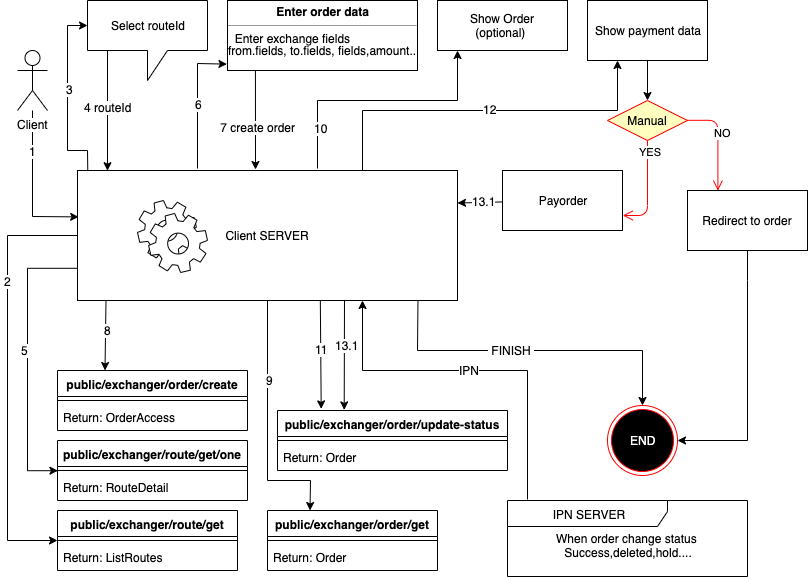
Create order
Use method public/exchanger/order/create
| Name | Description | Type |
| routeId | id route | ObjectID |
| partner | link partner | STRING |
| amount | amount in | FLOAT |
| fromValues[0][key] | key name | ObjectID |
| fromValues[0][value] | value for this field | STRING |
| toValues[0][key] | key name | STRING |
| toValues[0][value] | value for this field | STRING |
| routeValues[0][key] | key name | ObjectID |
| routeValues[0][value] | value for this field | STRING |
| lang | lang client (ru,en) | STRING |
| agreement | agreement | BOOLEAN |
| hideOutData | secure out requisites | BOOLEAN |
| clientCallbackUrl | a callback when the application is completed the client will see a button for return back to the site and the client will be directed to this URL ?status=success or ?status=error | STRING |
| ipnUrl | instant payment notification url (will be called when the order has changed status) | STRING |
| ipnSecret | string for create secure hash in ipn url | STRING |
You can find the documentation for the authorization system in your personal cabinet. More about working with methods and additional data can be found on the
IPN (Notification about the payment request status change)
In order to receive a notification of order status change when creating an order, you need to send additional parameters:
clientCallbackUrl- a callback when the application is completed the client will see a button for return back to the site and the client will be directed to this URLhideOutData- hide the recipient's detailsipnUrl- HTTP/HTTPS link to notify your server.ipnSecret- Random string for creating a request signature (for maintaining request integrity)
- The request will be sent by POST method
- IPN will be sent once
- IPN delivery is not guaranteed (if the server did not respond to the request it will not be resent)
Example IPN
- POST
- ['Content-Type'] = 'application/x-www-form-urlencoded'
orderUID:Number() - order uidorderId:String(ObjectId) -order idnewStatus:String() - order current statusinAmount:String(number) - order in sumoutAmount:String(number) - order out sumxml_from:String() - order uidxml_to:String() - order uidtimestamp:Number() - unix time ipn notifytoValues:Array([{key,name,value}]) - order requisites
Statuses list
new- new orderwaitPayment- wait user paymenterrorPayment- error user payment (merchant send error)inProgress- in progress (expects admin or payment of the application)inProgressPayout- in line for payment (payment accepted successfully) (if configured in currency auto payment it will be initialized)errorPayout- payment error (error occurred during payment)hold- frozen (problems with the application)done- order completed successfullyreturned- the order was paid but not all exchange conditions were fulfilled and the means of return to the senderdeleted- order deleted (canceled)
Verification of the request checksum (IPN)
sha256(orderId:newStatus:inAmount:outAmount:xml_from:xml_to:timestamp:ipnSecret)
const stringForHash = orderId+":"+newStatus+":"+inAmount+":"+outAmount+":"+xml_from+":"+xml_to+":"+timestamp+":"+ipnSecret;
// example string for hash 5d8e6002b80b7b4cd75a6424:inProgress:2:317.42:ETH:WMZ:1571328406072:SECRET123

const hash = crypto.createHash('sha256').update(stringForHash).digest('hex')
// example hash af3acf947e6f0e0f2c267e300b8582e504dba12d1f2d058652b7414163c09f48
Payment control
- If you need to control the status of requests, create them using authorization, then all requests will be reflected in your personal cabinet;
- You can save the UID of the request and secret and manually go to the request by specifying this data in the address bar
Payment
-
You can use / payment / to show payment page
            // schema

            https://atlantpay.com/user-lang/payment/order-uid/order-secret

            // example result

https://atlantpay.com/en/payment/1409/dGqwF2M2eBPaSN1G5ljMS1cb - Also you can simply give a link to the exchange as it is seen by all clients according to the same scheme as it is specified in the first variant except /payment/ should be replaced with /order/
- There are parameters in the method that allow you to display the payment data or the form of payment on your site you can use them. IMPORTANT: if the method with manual payment you need to update the status of the order from waitPayment to inProgress after payment.
 Affiliate rate
 Be the first to receive favorable payment solutions
 Personalized technical support 24/7
 Unique bots to simplify your work
 Partner's personal cabinet
 Flexible customization system for any task






