
Working hours: Mon–Sun from 10:00 to 22:00 (UTC+2)
Menu icon

Partner integration docs

Integration with monitoring

How to get a referral link

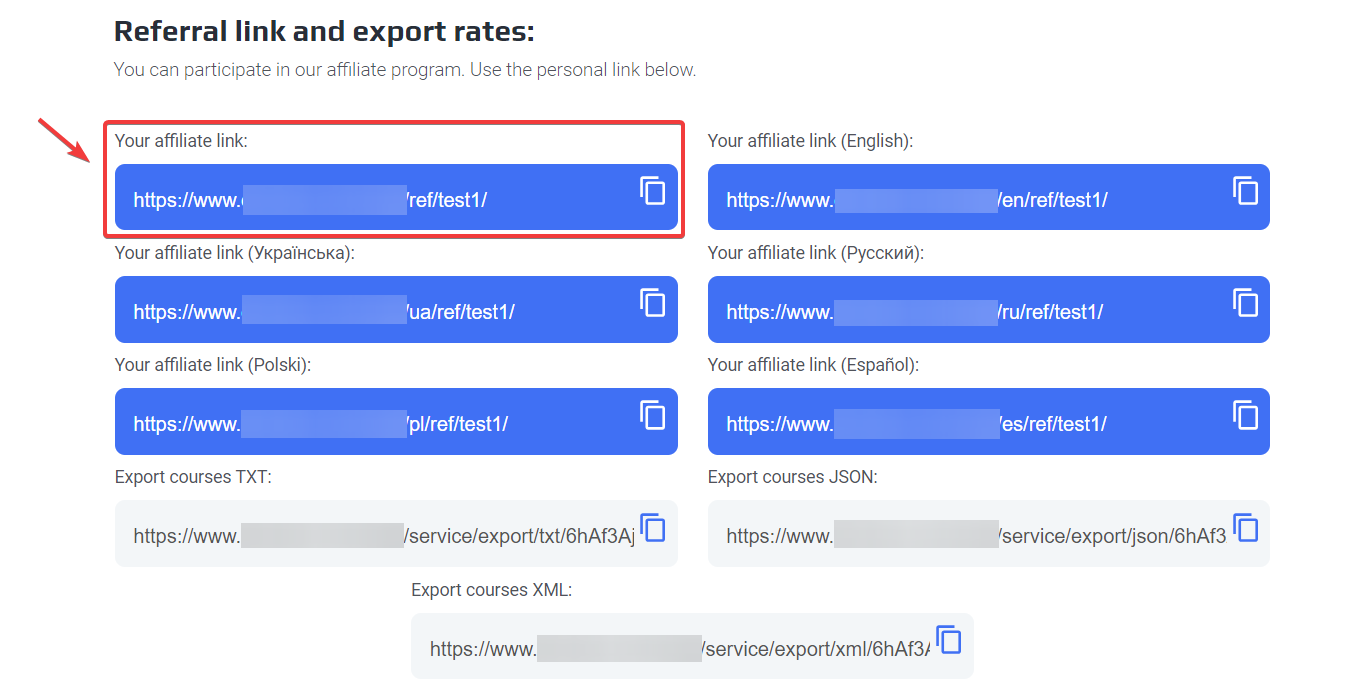
To get your partnership link, you need to enter your account using email and password then go to 'profile' section 'partnership program' and your partnership link is located below.


The exchange item can take Cur_from and Cur_to GET parameters, transmitted from monitoring at the time of the user transition to the exile to the exchanger website.

When the user is moving from monitoring, the Cur_from and Cur_to GET-parameters can be added to the URL of the exchanger’s URL.As names of currencies, short letter codes are used.These data must be used to redirect the user to the page of the exchange direction selected by the user earlier in monitoring, or for an automatic substitution of selected currencies in the lists of choice.
Example link with parameters: https://atlantpay.com/ref/XXXXXX/?cur_from=PMUSD&cur_to=BTC


Links to export courses:

XML

https://atlantpay.com/service/export/xml/:code

JSON

https://atlantpay.com/service/export/json/:code

TXT

https://atlantpay.com/service/export/txt/:code

API for partners

How to get API-Key?

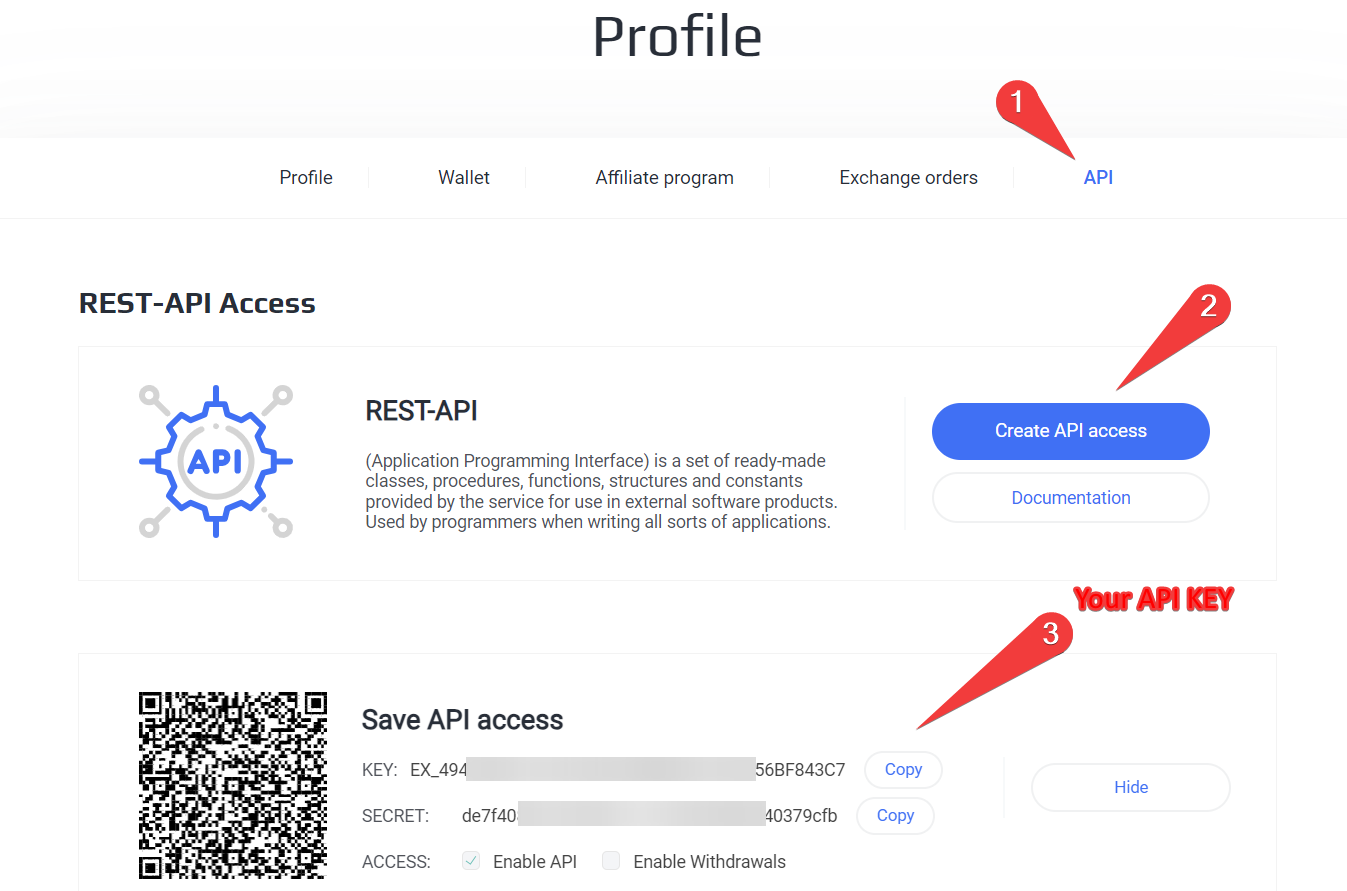
To get your partnership link, you need to enter your account using email and password then go to 'profile' APIs and click on the 'Create API Access' button' after copying the data that will appear below there will be your API Key.

Request address:

URL: https://atlantpay.com/service/partner/api.php

Passed by Get with parameters:

api_action – pp
api_key – Your personal key
method – Module APA method


The link to the API will look approximately as follows:


get_info - Information about the account and payment methods

Options:
Name Type Required Description
Additional parameters are not accepted
Result:
{
  status: "success",
  error: 0,
  error_text: "",
  data: {
    balance: 15,
    totalReceived: 0,
    link: "test",
    min_payout: 99999999,
    items: { },
  },
}


get_exchanges- Your partnerships

Options:
Name Type Required Description
start_time Integer No the time from which to display data (unix)
end_time Integer No the time to which display data (unix)
Result:
{
  status: "success",
  error: 0,
  error_text: "",
  data: {
    items: {
      1895: {
        id: 1895,
        time: 1590356264,
        date: "2020-05-24 21:37:44",
        course_give: 0,
        course_get: 241.57,
        amount_give: 0,
        amount_get: 241.57,
        exchange_success: 1,
        accrued: 1,
        partner_reward: 0,
        user_hash: "1r7",
      }
    }
  }
}


get_links- Partnerships

Options:
Name Type Required Description
start_time Integer No the time from which to display data (unix)
end_time Integer No the time to which display data (unix)
Result:
{
  status: "success",
  error: 0,
  error_text: "",
  data: {
    items: {
      1631577600: {
        id: 1631577600,
        time: 1631577600,
        date: "2021-09-14 00:00:00",
        browser: "Unknown",
        ip: "0.0.0.0",
        referrer: "",
        user_hash: "613fe600",
        query_string: ""
      }
    }
  }
}
      

Advantages of cooperation with us

We're a bargain. And here's why
  • Offline exchange icon Affiliate rate
  • Offline consulting icon Be the first to receive favorable payment solutions
  • Offline delivery icon Personalized technical support 24/7

Individual approach

We will develop the best solution for you and your business
  • Online exchange icon Unique bots to simplify your work
  • Online consulting icon Partner's personal cabinet
  • Online crypto exchange icon Flexible customization system for any task

REVIEW = MONEY

Your opinion is important to us!
We are pleased to announce the “Feedback = Money” promotion
For each review about our service on the specified resources we will reward you with 2 USDT .

  • Successfully close the deal
  • Select the platform where you want to leave your feedback
  • Provide the manager with the request ID and a link to the review

How it works?

01
Leave a request or contact a manager
02
Discuss challenges and connect the right solutions
03
Gaining access to the panel or API

Directions

CRYPTOCURRENCY EXCHANGE
INTERNATIONAL PAYMENTS
NATIONAL PAYMENTS
BUSINESS SOLUTIONS
  • Crosschain exchange Arrow bottom icon
    Instant transfer from one network to another
  • Asset conversion Arrow bottom icon
    Exchange and conversion of cryptoassets
  • P2P Output Arrow bottom icon
    P2P Output

*Didn't find the right direction - leave an application and get solutions within 5 minutes

Referral program

For agents
For partners
For clients
For bloggers

Agents at atlantpay earn in several ways:

  • Lifetime commission of 10% from the profit of the clients you refer.
  • Build your business using atlantpay resources and set your own pricing.

About Us

Atlantpay is a cryptocurrency exchange with additional services for paying for goods and services, as well as money transfers worldwide, including Ukraine, Europe, Asia, CIS, Africa, Latin America

    Frequent questions

    How do I create a request?
    What is the minimum exchange amount?
    What is a Bitcoin network confirmation?
    How can I track the status of my request?
    I paid the request, but the money has not arrived in my account. What is the reason?
    Why is my request taking so long to process?

    To create a request, you need to follow these instructions: 1. Choose the exchange direction (e.g., in the “Give” column - USDT TRC20, in the “Receive” column - Monobank) and specify the amount you want to exchange or receive. 2. Fill in your details in the “Input data” column, specifically, enter your email, wallet number (card or account) from which you want to transfer the money, the wallet number (card or account) to which you want to receive the money, and check the "I am not a robot" box. 3. Click the “Exchange Now” button, after which you will see our details for the transfer in a pop-up window. In the case of banks, during the first exchange, the system will ask you to verify the card from which you wish to transfer. This is only required once per new card. 4. Copy our details and click the “Proceed to Payment” button, after which you will be redirected to the Bank or PS website. Enter the amount specified in the request and our details, and confirm the transfer. Make sure that the amount has been deducted. 5. Then return to our website and confirm the payment by clicking the “I paid” button. Done. 6. After creating the request, you will receive an email with the status of your request, and you will automatically be registered on our service. To confirm registration, you need to follow the link provided in the email. By confirming your registration, you will be able to track the status of requests in your account, participate in the referral program, and receive discounts.

    More questions?

    Contact our support service




